
Are you still shooting in auto mode because you’re not sure what “aperture” means and what the heck an “f/stop” is?
Would you like to learn more about depth of field, and how it relates to aperture?
Then keep reading because today’s article is dedicated to all things aperture in photography.
In the post, I’ll explain:
- what the aperture does in a camera
- what depth of field is and how it relates to the aperture
- how to determine which aperture to choose
- how to use the aperture setting creatively (e.g. for creating a blurry background/”bokeh”)
What is aperture in photography?
First of all, what exactly IS the aperture in a camera?
In the literal sense of the word, “aperture” means “opening” or “open space”.
Thus, in your camera lens, the aperture is the opening controlling how much light falls into the camera.
It actually works quite a lot like the pupil in your eye, which expands or contracts depending on light conditions.
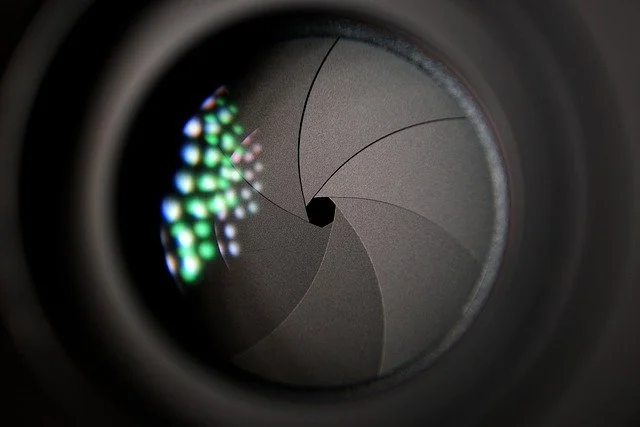
In a camera lens, you can actually see the aperture – it has little blades that control the opening.
They expand for more light or contract for less light (depending on the setting in your camera).
Have a look at the photo below where you can clearly see the aperture blades:
Why is the aperture necessary?
At this point, it may be useful to quickly explain how a camera works, as this will really help you get comfortable with setting the aperture manually.
If you already know this, feel free to skip to the next section!
How a camera works
Basically, every camera has some kind of light sensitive surface inside, either film or a sensor.
When you take a photo, the light (which is being reflected back from your subject) falls into the camera and onto that light sensitive surface, creating a light pattern.
That pattern with light and dark areas is then converted into an image, either by developing the film in the darkroom or digitally by your camera.
But of course the camera isn’t just an open box, letting in all available light.
Instead, there are mechanisms in the camera controlling how much light falls onto the sensor or film.
These mechanisms are:
- the camera lens, redirecting all the light beams into a single point on the sensor or film to create a sharp image
- the shutter, a little “curtain”, which opens and closes when you take a shot
- …and of course the aperture, the opening in the lens, controlling the amount of light falling into the lens
Getting comfortable with setting the aperture manually
In auto mode, the camera selects the best aperture setting in order to achieve the correct exposure, depending on light conditions and some other factors (rather than you having to make that choice yourself, like in manual mode).
However, there are many situations in which you don’t want to leave this up to your camera, for example because:
- the “correct” exposure is not what you want, as it doesn’t result in a beautiful or interesting photo
- you want to use studio lighting, in which case you need to control the aperture manually
- you want to use the aperture creatively, so the auto setting won’t work
- you want to use an analogue camera without auto mode and need to understand how to determine the aperture
So, instead, try to get used to setting the aperture manually.
You can either:
1) Use aperture priority mode – marked by a little “A” on your camera dial
In aperture priority mode, you choose which aperture you want.
The camera then does the rest and calculates the correct ISO and shutter speed for you.
This is a great semi-automatic mode which already gives you more creative control.
The second option:
2) Use manual mode and set ISO, shutter speed and aperture yourself
If you’re willing to familiarize yourself with ISO and shutter speed, you can also control all settings yourself (make sure to return to this blog next week as I’ll talk about ISO and shutter speed in my next post).
What is an f/stop and which one do you need?
When it comes to setting the actual aperture, this is done by adjusting the f/stop – the setting in your camera related to the aperture (the letter “f” stands for the focal length of the lens).
In simple terms, the f-stop determines how much light passes through the camera lens.
Confusingly, a small f-stop means that the opening in the lens is large, whereas a high f/stop means the opening is small.
Example:
At f/stop 1.4, the aperture is wide open and lets in a large amount of light
At f/stop 22, the aperture is very narrow and only lets in very little light
(If you want to get technical, it may be helpful to know that each f/stop actually represents a halving of the light intensity from the previous stop, so for example f/stop f/1.4 lets in twice as much light as f/2. This is because f/stops aren’t actually whole numbers, but ratios derived from your lens’ focal length divided by the diameter of your aperture).
Don’t let this theory overwhelm you though.
I was never good at maths and get easily confused by numbers, and even I managed to wrap my head around it, so I promise you that you’ll get the hang of f/stops really quickly.
All you need to remember is:
The higher the f/stop, the less amount of light passes through the aperture.
How to determine the right aperture setting
OK, now we know how to set the aperture…but how do you know which aperture to set?
I would say that there are two things you have to keep in mind in order to determine your aperture setting.
These are:
1) The lighting situation
2) The desired sharpness/blur level in your photograph
1) The lighting situation
Let’s first talk about the lighting situation.
Generally, when you take a photograph, you want it to be “correctly’ exposed, meaning:
It’s neither too dark nor too bright.
Therefore, if the lighting conditions are good, for example on a bright sunny day outside, you will probably need to use a smaller aperture (higher f/stop) in order to avoid the photo being too bright.
If you’re shooting indoors in low light conditions, you will need a wide aperture (low number f/stop) so that the photo won’t come out too dark.
2) Desired sharpness/blur level in your photograph
The second thing you’ll want to consider when setting your aperture is the desired sharpness or amount of blur in your photo.
The technical term for this is depth of field, meaning (loosely), how much in the photo is sharp/in focus.
I’ll explain this in detail in the next section, but for now, remember this:
Using a wide aperture (low number f/stop) leads to a more shallow depth of field (a smaller area in your photo will be sharp)
Using a small aperture (high number f/stop) leads to a deeper depth of field (a larger area in your photo will be sharp)
Everything you need to know about depth of field
As you can see, talking about the aperture kind of goes hand in hand with depth of field.
This is because the choice of aperture has a direct effect on the depth of field, which is defined as:
“ the distance between the nearest and the furthest objects that are in acceptably sharp focus”
That distance (the area in which things appear to be in focus) will be shorter or longer depending on aperture setting.
For example, look at this photo taken with a wide aperture:

You can see that the background is totally blurry, as are some parts of the leaves and stem.
Only a very narrow area in this photograph is actually in focus (the petals and water drops).
You would need to use a very wide aperture to achieve this very shallow depth of field.
In contrast, look at this landscape shot:
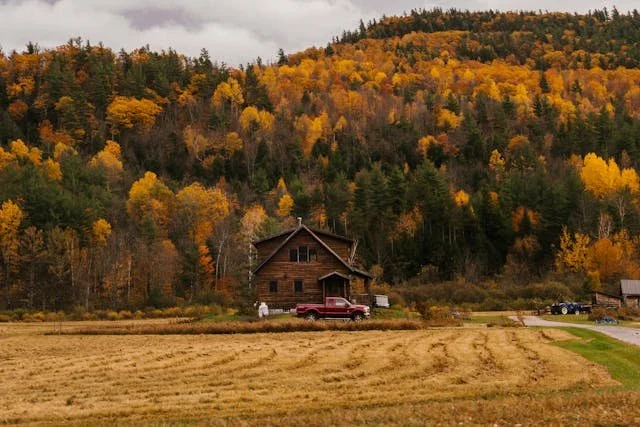
You can see here that both the foreground and background appear to be in reasonable focus.
To achieve such a shot, you would need to choose a small aperture, resulting in a deep depth of field.
What does this mean for your photography?
As I’ve explained, a large aperture leads to a more shallow depth of field, resulting in more out of focus/’blurry” areas.
Therefore, when choosing the aperture setting in your camera, you always want to consider what effect you want to achieve:
Do you want most things in your photo to appear sharp (for example when photographing a landscape or a cityscape)?
Then choose a smaller aperture (something around f/8, f/11, or f/16).
Do you want to emphasise certain parts in your image by making the background or foreground blurry?
Then choose a wide aperture, e.g. f/2.8.
How to create bokeh
You may have heard of bokeh, which is a very popular effect achieved by using a wide aperture setting.
Here is an example:

You can see that the background is very blurry, with the lights appearing as circular shapes.
To achieve this effect, you will need a lens with an aperture of f-stop 2.8 or wider.
If you’re using a zoom lens, you may notice that it won’t have such a wide aperture, so you may need to borrow or buy a prime lens for this purpose.
The kind of bokeh you get is also dependent on the shape of the blades in the lens – the more rounded the aperture blades are, the more soft and rounded the bokeh circles.
You should also know that a longer focal lens creates more extreme bokeh, so for example an 85mm lens would work better than a 50mm lens.
Finally, it helps to Increase the distance between subject and background, and to use a backlight or side light.